
 English
 Arabic
 Chinese
 Dutch
Dutch Finnish
 French
 German
 Hebrew
 Hindi
Hindi Italian
 Japanese
 Korean
 Polish
 Portuguese
 Russian
 Spanish
 Swedish
Invalid ECU Image / Write Attempt Failed - What It Means and How to Fix It
 charlie@ftecu.com
Posts: 21Staff User
charlie@ftecu.com
Posts: 21Staff User
TL;DR / QUICK FIX
If you receive “Invalid ECU Image” / “Write Attempt Failed,” first identify which situation applies.
Stock works, unrestricted fails
If the stock file for your exact ECU part number flashes successfully, but the matching unrestricted file fails with Invalid ECU Image, the unrestricted ECU image may be invalid or corrupted.
Quick fix:
- Open the working stock file and the matching unrestricted file.
- In the unrestricted file, right-click ECU Mapping and select Copy.
- In the stock file, right-click ECU Mapping and select Paste.
- Confirm the popup shows Paste Operation Successful for the applicable items.
- Save the modified stock file as a new file using Save As.
- Flash the newly created file.
This keeps the known-good stock ECU image while carrying over the desired mapping changes from the unrestricted file.
Please also email sales@ftecu.com with your ECU part number, the exact stock file that works, and the exact unrestricted file that fails. This lets us locate and correct the affected file in our File Manager.
File worked before, then failed after a change
If the same file flashed successfully before and only starts giving Invalid ECU Image after you change one or more settings, save both versions.
Send us the last working file, the failing file, your ECU part number, and a description of what changed.
Stock file also fails
If the matching stock file also produces Invalid ECU Image, do not assume the workaround above applies.
Contact sales@ftecu.com so we can review the ECU, files, and flashing history.
DETAILED EXPLANATION
Hello everybody!
This post covers an issue we see fairly often: “Invalid ECU Image - Write Attempt Failed.”
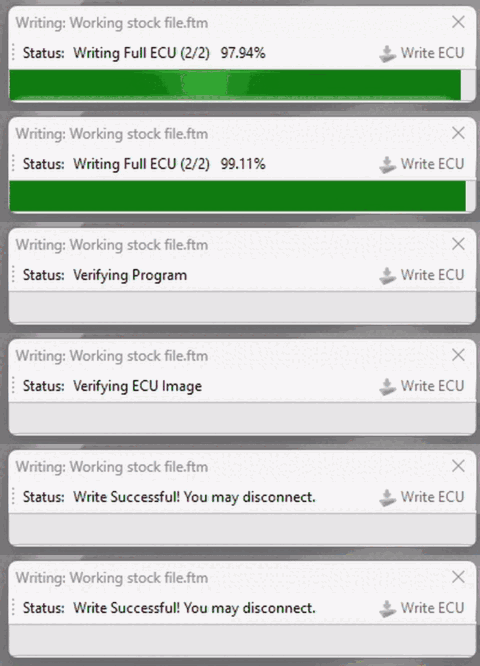
A common situation is that you first download the stock file for your ECU part number and flash it successfully. Communication is good, the write completes, and your license is assigned.
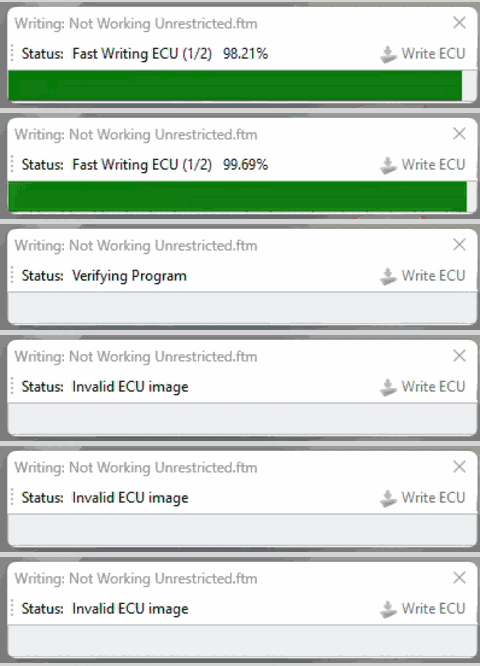
You then download the unrestricted file for the same ECU part number and attempt to flash it. The write reaches approximately 99% and then fails with “Invalid ECU Image” / “Write Attempt Failed.”
WHAT THIS USUALLY MEANS
When the matching stock file flashes successfully but the unrestricted file does not, the unrestricted ECU image is the first thing we want to rule out.
Occasionally, an unrestricted file in our File Manager may contain an invalid or corrupted ECU image even though the matching stock file works normally.
The important diagnostic pattern is:
Stock file = successful
Matching unrestricted file = Invalid ECU Image
If this is what you are seeing, please email sales@ftecu.com with your ECU part number, the exact stock file that works, and the exact unrestricted file that fails. If possible, use the exact file names shown in File Manager.
Reporting the affected file pair allows us to locate and correct the unrestricted file so other customers do not run into the same issue.
HOW TO WORK AROUND IT
Before continuing, verify that the stock and unrestricted files are for the exact same ECU part number.
- Open both files in the FTECU software.
- In the unrestricted file, right-click the ECU Mapping folder and select Copy.
- In the stock file, right-click the ECU Mapping folder and select Paste.
- Verify the popup shows Paste Operation Successful for the applicable items.
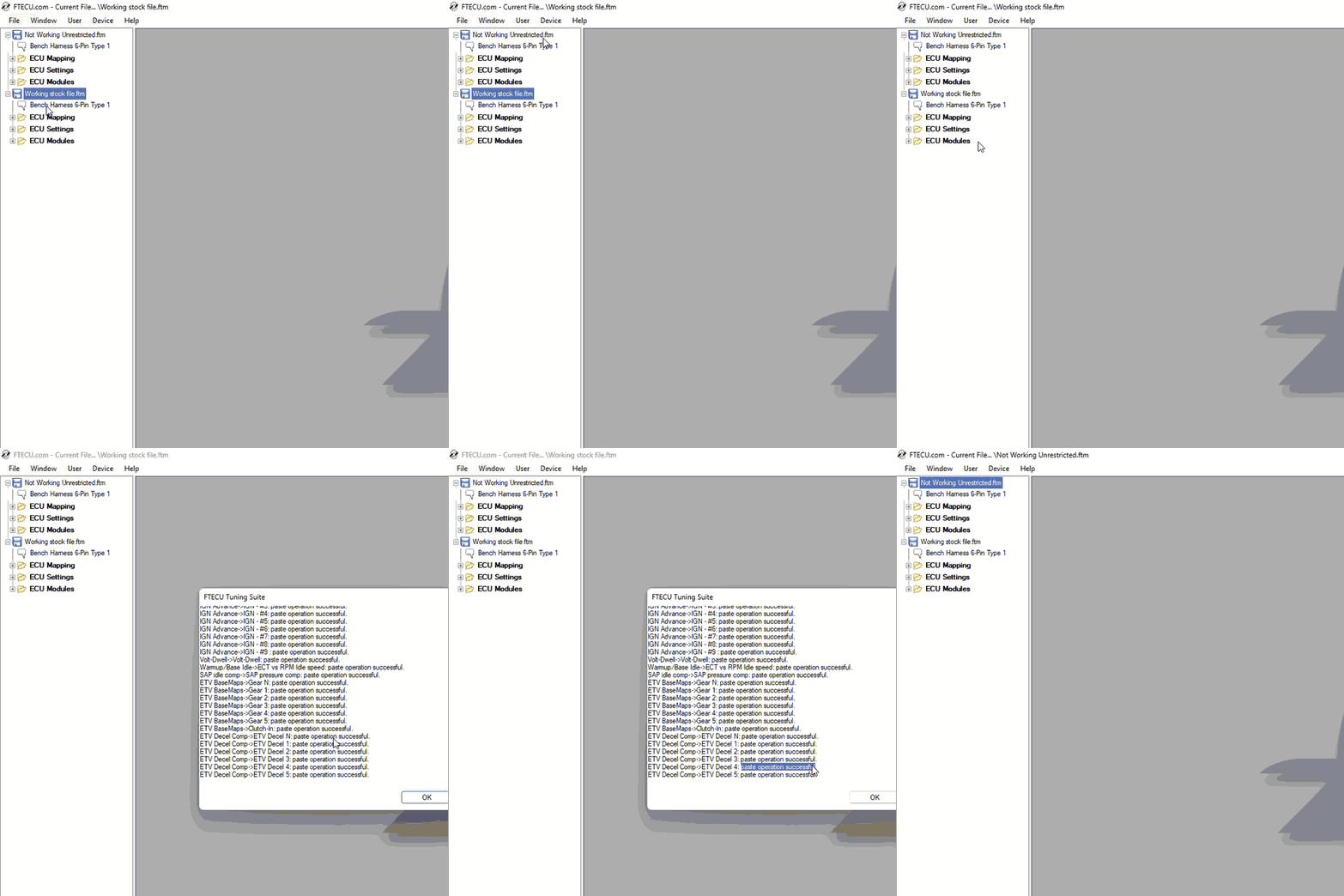
Once complete, save the modified stock file as a new file. Right-click the file in the navigation tree on the left and select Save As.
Then flash the newly created file.
This uses the known-good stock ECU image as the base while carrying over the desired mapping changes from the unrestricted file. In most cases, the new file can then be flashed normally.
IF THE FILE WORKED BEFORE
Invalid ECU Image can also appear after changing a file that previously flashed successfully.
Example:
File A flashes successfully.
You make one or more changes.
You save the new version as File B.
File B now produces Invalid ECU Image.
If that happens, one of the changes between File A and File B may be causing the ECU image to become invalid.
This does not necessarily mean you configured something incorrectly. A particular setting, combination of settings, or software behavior may be responsible.
Please send us both File A and File B along with your motorcycle year/make/model, ECU part number, and a description of the changes between the files.
If possible, do not make additional changes before sending them. The closer the working and failing files are to each other, the easier it is for us to isolate the cause and provide a corrected or test file.
IF THE STOCK FILE ALSO FAILS
If the matching stock file also produces Invalid ECU Image, do not assume the map-copying workaround above applies.
This guide is primarily for the situation where the stock file flashes successfully but the matching unrestricted file does not.
If the stock file also fails, your issue may have a different cause.
Contact sales@ftecu.com with your ECU part number and the files you are working with so we can investigate further.